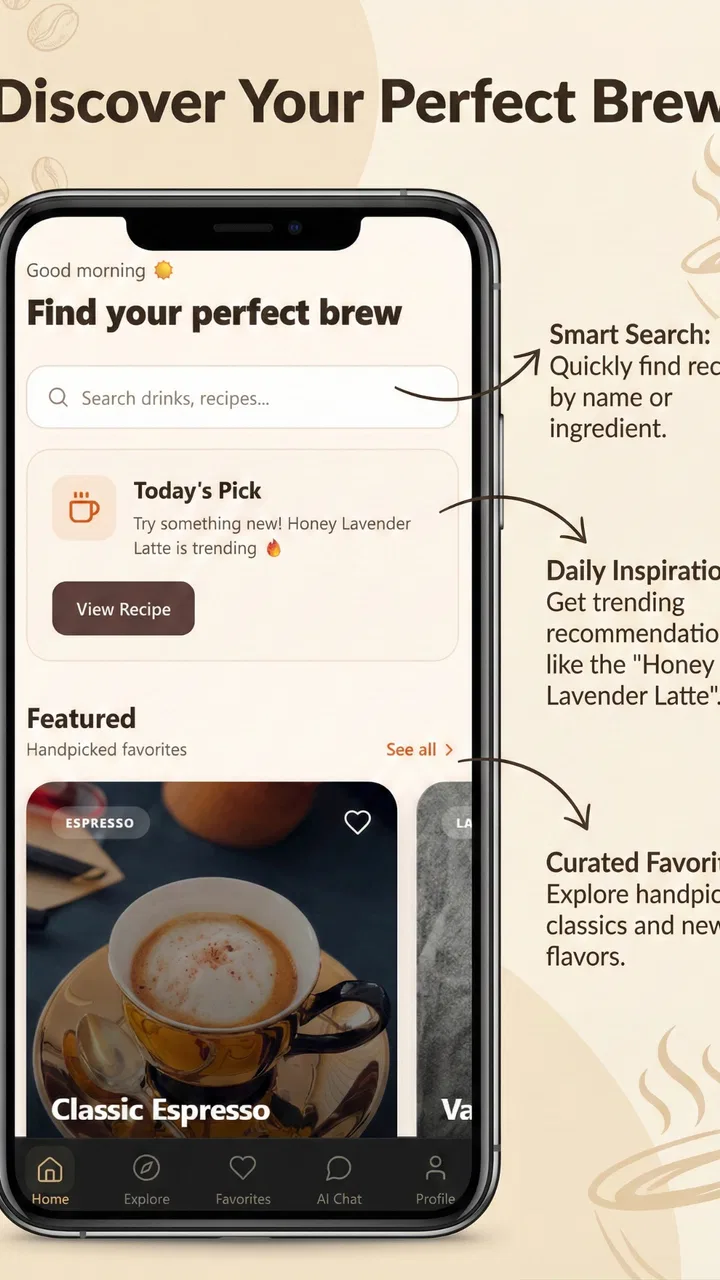
Sippd Coffeely
- 0.0
- Rating
- 10.00K
- Installs
- Free
- Price

 Analysis by App-foxy
I approached Sippd Coffeely as the kind of coffee companion that might live on a shared kitchen phone rather than as a serious replacement for a dedicated brewing machine. It is a free Food & Drink app from NathanPham, built around discovering coffee, timing a brew, saving custom recipes, and getting help from an AI assistant. That combination sounds simple, but it changes how useful the app feels in a household: one person can use it for a quick morning routine, while another can treat it as a small notebook for experimenting with coffee.
My overall impression is positive, with an important qualification. The app is most appealing when you want guidance and repeatability without carrying a separate timer, recipe card, and coffee reference around the kitchen. It is less convincing if you already have a trusted brewing workflow and only need a stopwatch. The current version is 1.1.5, and the app runs on Android 7.0 or later, which makes it accessible to many older devices that might otherwise be left in a drawer.
How it works when more than one person uses the kitchen
A realistic use case is a shared household where coffee habits are not identical. I might prefer a lighter cup and a longer, slower brew, while someone else wants a stronger morning drink with as little decision-making as possible. Instead of passing around a paper recipe or trying to remember which timer setting belongs to whom, each person can use the app as a starting point for their own routine.
You May Also Like

 Blood Strike: 2.5 Anniversary
Blood Strike’s Loadouts Turn Every Drop Into a Tactical Gamble
A close look at Blood Strike’s custom loadouts: how fast access to signature weapons reshapes its battle royale rhythm, rewards preparation, and narrows the gap between fights.

 Pandora - Music & Podcasts
Pandora’s Music Is Easy to Start, but Harder to Recover
Pandora’s strength is its low-effort path from a seed to a station. Its weak spot is how much confidence it asks you to place in connection, setup, and quiet recovery.

 8 Ball Pool
 Is Built on Rivalries, Rematches, and Routine
A close look at the rivalries, rematches, shared routines, and unanswered safety questions that turn a quick pool match into a persistent mobile community.

 Samsung Music
’s Quiet Strength Is Playing What You Already Own
Its reach comes less from spectacle than from dependable access to a personal library. That simplicity is both the app’s strongest retention engine and its ceiling.

 AccuWeather: Weather Radar
AccuWeather Review: A Quick, Clear Forecast for Everyday Decisions
For everyday plans, the best forecast is the one you can understand quickly. AccuWeather makes rain timing, radar, and local conditions easy to act on, with a few trade-offs.

 Hill Climb Racing
Why Hill Climb Racing Still Turns Crashes Into One More Run
A tiny car, a bumpy hill and one more upgrade: Hill Climb Racing keeps resurfacing because its simple chaos makes every near-miss feel personal.
More From Our News Desk
View All News


The interactive timer is the most immediately practical part. A brewing timer is easy to underestimate until you are actually pouring water, weighing coffee, or trying to follow several pauses. A normal phone timer can count down, but it does not feel designed around the rhythm of making coffee. Here, the timer sits alongside the recipe idea, so the process feels more deliberate rather than like a generic alarm borrowed from another app.
For shared use, I would keep the phone somewhere visible and dry, start the timer before the first pour, and avoid treating the screen as the only record of what happened. If another person takes over midway through a brew, a short spoken handoff still matters. The app can support coordination, but it cannot remove the need to communicate when two people are using the same kettle, grinder, or coffee supply.
That distinction is important. This is not a household management system, and I would not expect it to coordinate shopping, assign chores, or maintain separate family routines. Its value is narrower and more useful: it gives coffee preparation a shared reference point. One person can introduce a recipe, another can repeat it, and both can discuss the result without relying entirely on memory.
Why the timer feels more useful than a basic phone stopwatch
A stopwatch is flexible, but that flexibility can become friction. When I use a generic timer, I still have to remember when to start it, what each pause means, and whether I am following the same process as last time. Sippd Coffeely makes the timing part feel connected to the recipe itself, which is a better fit for someone learning consistency.
The practical trick is to use the timer as a repeatability tool rather than as a promise of perfect coffee. If a cup tastes weak, I would change one part of the recipe on the next attempt instead of changing the grind, water, timing, and coffee all at once. That makes the app more valuable over several mornings. It helps turn vague impressions into small experiments.
There is also a useful trade-off here. A guided coffee app can encourage people to follow a process too rigidly, even though beans, equipment, water, and personal taste vary. I would use the timer to create a baseline, then adjust it when the cup tells me to. The app is strongest as a memory aid and workflow guide, not as an unquestionable authority.
Custom recipes are where household differences become manageable
The custom recipe feature gives the app a reason to stay installed after the novelty of the assistant wears off. A household often has several “usual” coffees, and a single default routine is rarely enough. Saving a preferred method means I do not have to reconstruct the steps every time, especially when I am making coffee before work and do not want to think through the entire process.
My advice is to name recipes in a way another person can understand. A label based only on a bean name may be confusing after the bag changes. A more useful note would combine the coffee style with the situation, such as a gentle weekday brew or a stronger weekend cup. That approach makes the recipe easier to recognize on a shared device and reduces the chance that someone chooses the wrong routine.
There is a subtle limitation to shared custom recipes: a recipe saved on one device should not automatically be treated as a household standard. Taste is personal, and the same instructions can behave differently with another grinder or kettle. I would use saved recipes as starting points, then leave a short note about what to adjust. The app can preserve the method, but the drinker still has to judge the result.
Setup, boundaries, and everyday coordination
Because the app combines a timer, recipes, and an AI assistant, I would set expectations before handing the phone to a beginner. It is not just a digital recipe card, and it is not merely a chat tool. Each part serves a different moment: the assistant can help with questions, the custom recipe area can preserve a method, and the timer can keep the brew moving once preparation begins.
That separation is helpful on a personal phone, but it matters even more on a shared one. I would let each regular user agree on which recipes are household defaults and which are personal experiments. Without that simple boundary, a shared collection can become cluttered, and a beginner may not know whether a saved method is proven or merely something another person tried once.
The app is free to download and use, while in-app purchases range from ten cents to just under ten dollars per item. I would keep that in mind if several people use the same device, particularly when a curious child or guest is tapping through the app. A free starting point is convenient, but any purchase flow deserves the same attention as it would in another app. The safest household habit is to make sure the person using the phone understands when they are exploring and when they are moving toward a paid item.
I also would not confuse a shared device with shared ownership of personal information. If someone uses the app to record a preferred recipe or ask the assistant a question, other people may see that activity if the phone itself is shared. That is not necessarily a problem for coffee notes, but it is worth remembering when the device is used by guests, children, or multiple adults with different expectations of privacy.
Using the AI assistant without surrendering judgment
The AI assistant is potentially the most interesting feature for someone who is still learning. A new brewer can ask for help thinking through a method instead of searching across unrelated pages. That can make the first attempts less intimidating, especially when the user does not yet know the vocabulary needed to describe a brewing problem.
My practical recommendation is to ask focused questions and provide context. “Why is my coffee bad?” is too broad to produce a useful household routine. A better question explains what changed, what the cup tasted like, and which part of the process felt difficult. The more specific the question, the easier it is to turn the response into a testable adjustment rather than a long list of possibilities.
At the same time, I would not let the assistant settle arguments between family members as if it were a final judge. Coffee preference is not a safety-critical calculation, and two people can reasonably want different results. The assistant can suggest a direction, but the person drinking the cup should decide whether the change helped.
This is also where the app differs from a conventional recipe website. A static guide gives everyone the same instructions; an assistant can make the learning process feel more conversational. The downside is that a conversation may be less consistent than a clearly saved recipe. Once a household finds a method that works, I would preserve it in the custom recipe area rather than repeatedly asking the assistant to recreate it.
Age context and trust on a family device
The app is rated Everyone, which fits its subject matter: coffee preparation, recipes, timing, and general assistance are ordinary household topics. That age context makes it easier to imagine the app being present on a family tablet or kitchen phone. Still, an Everyone rating does not mean every interaction should be unsupervised or that every user will understand purchase prompts in the same way.
For younger users, I would treat the app as an opportunity to learn a simple routine with an adult nearby. Hot water, kettles, grinders, and electrical equipment deserve more attention than the screen itself. The app can help with sequence and timing, but it cannot replace an adult deciding what equipment a child may handle.
Trust works differently for adults sharing a phone. One person may be happy for others to edit recipes, while another may want their carefully tuned method left alone. Since I would not use the app as a formal account-management tool, the household needs an informal agreement: personal experiments should be labeled clearly, and established recipes should not be changed casually.
That may sound minor, but it is one of the most realistic friction points in shared use. A coffee app can be technically easy to operate and still become confusing when several people modify the same collection. Clear naming and a little courtesy do more here than any imagined family-control feature would.
A practical morning routine with the app
Imagine a weekday morning where one person has already prepared the coffee station and another arrives halfway through. The first person selects a saved recipe, starts the interactive timer, and begins the brew. If they need to step away, they can explain which stage is underway and let the second person follow the timing rather than guessing from the clock.
After tasting the result, the household can decide whether the recipe is worth keeping unchanged. If it is too bitter, too thin, or simply not suited to that coffee, the next attempt can become a controlled experiment. One user might consult the AI assistant for ideas, while another records the chosen adjustment in a custom recipe. That division of labor is more useful than having everyone independently search for advice.
The key is not to turn breakfast into a laboratory. I would save only methods that are genuinely repeatable and keep the rest as temporary experiments. Otherwise, the recipe area can become a museum of abandoned ideas. The app supports organization, but the user has to provide the discipline.
Where it fits among ordinary coffee alternatives
Compared with a paper notebook, Sippd Coffeely is more active because the timer participates in the brew instead of merely storing instructions. Compared with a generic stopwatch, it offers a more coffee-focused workflow through recipes and an assistant. Compared with a full coffee education site, it appears more convenient for the moment when the kettle is already hot and the user wants practical help rather than a long lesson.
Those comparisons also reveal when another option is better. A notebook may be preferable for someone who wants complete control, no screen near water, and a permanent record that is easy for everyone to annotate. A basic timer may be better for an experienced brewer who already knows every step and does not want suggestions. A detailed reference guide may be better for someone studying extraction deeply rather than trying to make a dependable cup before leaving home.
The app’s advantage is the middle ground. It gives beginners more structure than a blank timer while avoiding the commitment of a specialized coffee setup. For a shared household, that middle ground can be especially convenient because not everyone needs the same level of expertise. One person can use the recipes, another can rely on the timer, and a third can ask the assistant for an explanation.
The limitation is that the experience depends on the user keeping the system understandable. If recipes are poorly labeled or changed without notes, the app loses much of its household value. If the assistant is treated as a substitute for tasting and adjusting, it can also encourage overconfidence. I see it as a tool for making decisions easier, not for making them automatically correct.
Who should install it and who should pass
I would recommend it to a curious beginner, a coffee drinker who keeps forgetting timing steps, or a household with several preferred brewing routines. It is also a sensible choice for someone who wants to experiment gradually instead of buying more equipment immediately. The free entry point makes it easy to try the workflow before deciding whether the custom recipe and assistant features fit daily habits.
I would be more cautious about recommending it to a person who dislikes using a phone in the kitchen. If your ideal coffee routine is completely screen-free, the timer may feel like an unnecessary interruption. I would also skip it if you expect professional-level brewing analysis, automatic household profiles, or a formal way to separate every user’s activity. The app’s strengths are practical guidance and repeatability, not advanced account administration.
Device age is unlikely to be a major barrier for many Android users because the minimum requirement is Android 7.0. That said, compatibility alone does not decide whether the app belongs on a shared kitchen device. Screen visibility, battery habits, and the willingness of everyone to follow the same naming system matter just as much.
In terms of scale, the app has passed ten thousand installs. I read that as a sign that it has found an audience without treating popularity as proof that it will suit every coffee drinker. NathanPham has kept the concept focused: discover coffee, make a recipe personal, get assistance, and time the brew. The focused design is appealing, provided the user does not expect it to become a complete household organizer.
My household verdict
After looking at the app through a shared-device lens, I think its best role is a cooperative coffee notebook with an active timer. It can help a household agree on repeatable methods, teach a newcomer how to follow a process, and give an experienced drinker a convenient place to preserve experiments. The AI assistant adds approachability, while custom recipes give the experience a memory that a normal timer lacks.
I would introduce it to a household with three simple rules: label recipes clearly, mark experiments as experiments, and treat purchase prompts carefully. I would also keep the phone away from splashes and make sure an adult handles the equipment when younger users are involved. Those habits are not app features, but they determine whether the app remains helpful or turns into another source of kitchen confusion.
My final recommendation is favorable for people who want a flexible coffee companion rather than a rigid training system. It is free, suitable for Everyone, and available for older Android devices, with optional in-app purchases from ten cents to just under ten dollars per item. The real strength is not any single feature; it is the way the timer, recipes, and assistant can support different levels of coffee experience in one shared routine.
For my own household shortlist, I would choose Sippd Coffeely when the goal is to make brewing easier to repeat and easier to discuss. I would choose a notebook or a plain timer when simplicity matters more than guidance. That is a healthy boundary for the app: it does not need to replace every coffee tool to be worthwhile. It only needs to make the next cup clearer, more consistent, and a little less dependent on whoever happens to remember the recipe.
With its February 11, 2026 release and current version 1.1.5, it is a relatively focused option for Android coffee routines. I would try it first with one or two dependable recipes, then decide whether the assistant genuinely improves the household’s decisions. If it does, the app earns a permanent place on the kitchen phone; if not, the familiar stopwatch and a handwritten note may still be the better fit.
FAQs for Sippd Coffeely
01What is Sippd Coffeely, and what can I use it for?
Sippd Coffeely is a coffee-focused app designed to help users discover, explore, and keep track of coffee-related information. Depending on the available features and your location, it may help you browse drinks, learn about coffee options, find cafés, save favorites, or organize your preferences. It is most useful for coffee fans who want a convenient digital companion rather than a simple ordering app.
02Is Sippd Coffeely free to download and use?
The app may be available to download at no initial cost, but some features can depend on the developer’s current business model, regional availability, or optional in-app purchases. Before installing, check the Google Play Store or Apple App Store listing for pricing, subscriptions, and purchase details. Also review whether certain premium tools, promotions, or café-related services require payment.
03Does Sippd Coffeely require an account or personal information?
Some parts of Sippd Coffeely may be accessible without registration, while features such as saving preferences, syncing data, receiving personalized recommendations, or using location-based services could require an account. During setup, review every permission and privacy request carefully. Only provide information you are comfortable sharing, and consult the app’s privacy policy to understand how data is collected and used.
04Can I use Sippd Coffeely to find cafés or order coffee?
Sippd Coffeely’s café discovery or ordering capabilities may vary according to your country, city, participating businesses, and the version of the app installed on your device. If local listings are available, location access may improve results, although it may not be mandatory. Users should confirm opening hours, menu prices, delivery terms, and order availability directly before relying on the app.
05What should I check before downloading Sippd Coffeely?
Before downloading Sippd Coffeely, check that your Android or iOS device meets the listed operating-system requirements and that enough storage space is available. Read recent user reviews, examine the developer information, and verify the latest update date. It is also worth reviewing permissions, privacy practices, subscription conditions, and whether the app’s main features are supported in your region.
Pros
- Simple interface makes browsing coffees quick and convenient.
- Useful for discovering new coffee options in one place.
- Suitable for casual users who want a lightweight coffee app.
- Product details are generally easy to scan and understand.
- Can help organize personal coffee preferences more efficiently.
Cons
- Some features may require an account or additional setup.
- Coffee information may vary in depth between different entries.
- The app’s usefulness depends on the availability of supported products.
- Notifications could become unnecessary if preferences are not adjusted.
- Users may encounter limited options in certain regions or markets.

Sippd Coffeely
Gallery